Saturday, April 9
1. Cain and Abel : The top password recovery tool for Windows
UNIX users often smugly assert that the best free security tools support their platform first, and Windows ports are often an afterthought. They are usually right, but Cain & Abel is a glaring exception. This Windows-only password recovery tool handles an enormous variety of tasks. It can recover passwords by sniffing the network, cracking encrypted passwords using Dictionary, Brute-Force and Cryptanalysis attacks, recording VoIP conversations, decoding scrambled passwords, revealing password boxes, uncovering cached passwords and analyzing routing protocols
2. John the Ripper : A powerful, flexible, and fast multi-platform password hash cracker
John the Ripper is a fast password cracker, currently available for many flavors of Unix (11 are officially supported, not counting different architectures), DOS, Win32, BeOS, and OpenVMS. Its primary purpose is to detect weak Unix passwords. It supports several crypt(3) password hash types which are most commonly found on various Unix flavors, as well as Kerberos AFS and Windows NT/2000/XP LM hashes
3. THC Hydra : A Fast network authentication cracker which support many different services
When you need to brute force crack a remote authentication service, Hydra is often the tool of choice. It can perform rapid dictionary attacks against more then 30 protocols, including telnet, ftp, http, https, smb, several databases, and much more
4. Aircrack : The fastest available WEP/WPA cracking tool
Aircrack is a suite of tools for 802.11a/b/g WEP and WPA cracking. It can recover a 40 through 512-bit WEP key once enough encrypted packets have been gathered. It can also attack WPA 1 or 2 networks using advanced cryptographic methods or by brute force. The suite includes airodump (an 802.11 packet capture program), aireplay (an 802.11 packet injection program), aircrack (static WEP and WPA-PSK cracking), and airdecap (decrypts WEP/WPA capture files)
5. L0phtcrack : Windows password auditing and recovery application
L0phtCrack, also known as LC5, attempts to crack Windows passwords from hashes which it can obtain (given proper access) from stand-alone Windows NT/2000 workstations, networked servers, primary domain controllers, or Active Directory. In some cases it can sniff the hashes off the wire. It also has numerous methods of generating password guesses (dictionary, brute force, etc). LC5 was discontinued by Symantec in 2006, but you can still find the LC5 installer floating around. The free trial only lasts 15 days, and Symantec won't sell you a key, so you'll either have to cease using it or find a key generator. Since it is no longer maintained, you are probably better off trying Cain and Abel, John the Ripper, or Ophcrack instead.
6. Airsnort : 802.11 WEP Encryption Cracking Tool
AirSnort is a wireless LAN (WLAN) tool that recovers encryption keys. It was developed by the Shmoo Group and operates by passively monitoring transmissions, computing the encryption key when enough packets have been gathered. You may also be interested in the similar Aircrack.
7. SolarWinds : A plethora of network discovery/monitoring/attack tools
SolarWinds has created and sells dozens of special-purpose tools targeted at systems administrators. Security-related tools include many network discovery scanners, an SNMP brute-force cracker, router password decryption, a TCP connection reset program, one of the fastest and easiest router config download/upload applications available and more.
8. Pwdump : A window password recovery tool
Pwdump is able to extract NTLM and LanMan hashes from a Windows target, regardless of whether Syskey is enabled. It is also capable of displaying password histories if they are available. It outputs the data in L0phtcrack-compatible form, and can write to an output file.
9. RainbowCrack : An Innovative Password Hash Cracker
The RainbowCrack tool is a hash cracker that makes use of a large-scale time-memory trade-off. A traditional brute force cracker tries all possible plaintexts one by one, which can be time consuming for complex passwords. RainbowCrack uses a time-memory trade-off to do all the cracking-time computation in advance and store the results in so-called "rainbow tables". It does take a long time to precompute the tables but RainbowCrack can be hundreds of times faster than a brute force cracker once the precomputation is finished.
10 Brutus : A network brute-force authentication cracker
This Windows-only cracker bangs against network services of remote systems trying to guess passwords by using a dictionary and permutations thereof. It supports HTTP, POP3, FTP, SMB, TELNET, IMAP, NTP, and more. No source code is available. UNIX users should take a look at THC Hydra.
Saturday, April 9 0
Unable to surf net over work/college ? Want to surf net invisibly ? Well,we have a solution for that,SSH Tunneling.An SSH tunnel is an encrypted tunnel created through an SSH protocol connection. SSH tunnels may be used to tunnel unencrypted traffic over a network through an encrypted channel.In easy language,you can surf net without being monitored and even surf blocked sites too.SSH Is pretty awesome.
Without leaving your seat,you have a way to control a computer which ay be located anywhere on this planet.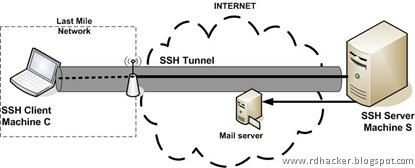
- The site is normally inaccessible from your current location (School/Work)
- You do not want your connection monitored (You’re using a WiFi hotspot/You’re in a country that monitors/censors your internet usage)
Step One: Setting Up the Tunnel
All common Linux distributions come with openssh packages. To check whether you have ssh installed already type the command "which ssh". Gentoo has opensh package preinstalled,so no tension :)
First we need to SSH to the server that we want to tunnel through, open up terminal and type the following command
Replace
Practical Example:
Now enter your password as usual, and it will hang after authentication, which is perfectly normal as it isn’t an interactive session- Now minimize the terminal and open Firefox.
Step Two: Configuring Firefox
In Firefox, Go to (Depending upon which version you are using)
A new window should appear,select the “Manual Proxy Configuration” option, you’ll need to type some information in the ‘SOCKS Host’ section.
Save your changes..Just to make sure it worked, check your IP with an online IP checker :)
Happy Surfing

XSS Shell is a powerful XSS backdoor which allows interactively getting control over a Cross-site Scripting (XSS) vulnerability in a web application. Demonstrates the real power and damage of Cross-site Scripting attacks.WHAT IS XSS SHELL ?
XSS Shell is powerful a XSS backdoor and zombie manager. This concept first presented by XSS-Proxy (XSS-Proxy: A tool for realtime XSS hijacking and control). Normally in XSS attacks attacker has one shot, in XSS Shell you can interactively send requests and get responses from victim, you can backdoor the page.
You can steal basic auth, you can bypass IP restrictions in administration panels, you can DDoS some systems with a permanent XSS vulnerability etc. Attack possibilities are limited with ideas. Basically this tool demonstrates that you can do more with XSS. FEATURES
XSS Shell has several features to gain whole access over victim. Also you can simply add your own commands.
Most of the features can enable or disabled from configuration or can be tweaked from source code.
Features:
- Regenerating Pages
- Keylogger
- Mouse Logger (click points + current DOM)
- Get Keylogger Data
- Get Current Page (Current rendered DOM / like screenshot)
- Get Cookie
- Execute supplied javaScript (eval)
- Get Clipboard (IE only)
- Get internal IP address (Firefox + JVM only)
- Check victim’s visited URL history
- DDoS
- Force to Crash victim’s browser
1. Copy "xssshell" folder into your web server
2. Copy "db" to a secure place (below root)
3. Configure "database path" from "xssshell/db.asp"
4. Modify hard coded password in db.asp [default password is : w00t]
5. Now you can access admin interface from something like http://[YOURHOST]/xssshell/Configure XSS Shell for communication;
1. Open xssshell.asp
2. Set "SERVER" variable to where your XSSShell folder is located. i.e: "http://[YOURHOST]/xssshell/";
3. Be sure to check "ME", "CONNECTOR", "COMMANDS_URL" variables. If you changed filenames, folder names or some kind of different configuration you need modify them.
Now open your admin interface from your browser,
To test it, just modify "sample_victim/default.asp" source code and replace "http://attacker:81/release/xssshell.js" URL with your own XSS Shell URL. Open "sample_victim" folder in some other browser and may be upload in to some other server.
Now you should see a zombie in admin interface. Just write something into "parameters" textarea and click "alert()". You should see an alert message in victim's browser.
-------------------------
SECURITY NOTES
-------------------------
- As a hunter be careful about possible "Backfire" in getSelfHTML(). Someone can hack you back or track you by another XSS or XSS Shell attack.
- Checkout "showdata.asp" and implement your own "filter()" function to make it safer for you.
- Put "On error resume next" to db.asp, better modify your web server to not show any error.
-------------------------
HOW CAN YOU EXTEND?
-------------------------
First implement it to xssshell.asp
1) Add new enum for your control
- Set a name and unique number like "CMD_GETCOOKIE"
- var CMD_SAMPLE = 78;
- Set datatype for your response (generally TEXT),
- dataTypes[CMD_SAMPLE] = TEXT;
2) Write your function and add it to page
- function cmdSample(){return "yeah working !"}
3) Call it
- Go inside to "function processGivenCommand(cmd)"
- Add a new case like "case CMD_SAMPLE:"
4) Report it back
- Inside the case call log;
"log(cmdSample(), dataTypes[cmd.cmd], cmd.attackID, "waitAndRun()");"
Secondly Implement it to admin interface;
- In db.asp just add a new element to "Commands" array (command name, command unique number, description).
i.e. "cmdSample()",78,"Command sample ! Just returns a message"
There are parameters and lots of helper in the code. Check out other commands for reference.
Enable debug feature to debug your new commands easily.
-------------------------
KNOWN BUGS;
-------------------------
- Keylogger is not working on IE
- Possibly not going to work for framed pages because of frame regeneration.
- Not working on Konqueror
DOWNLOAD:
http://www.ziddu.com/download/9267912/XSSShell039.zip.html

Download here:
http://www.ziddu.com/download/6966159/SUPERPHISHER.rar.html
Password: hackingguide
Hey H0w are u Doin Every0ne Today I Thought TO Teach You How To hack a Coinb0x And Bypass Payment And Talk Free Without Paying Its Really Simple And You Will Feel The p0wer Of hacking Read out ;)

Steps To Hack X:
1.Insert Coin
2.Dial 0##Phone No. *(star)
3.Call Unlimited
4.And Disconnect
5.Coin Comes Out
6.Go Home Smiling (hehehe)
ENJOY!!!
Note : Please Dont Try this Everytime…
Because coin box owners r not Rich like us ppl :| for them every rupee counts for life X_x
But ya For emergency Ya can Surely Try It
If You Liked It Please Follow Our Blog Share it Wth Ur FRiends And Keep Checking Out Our Posts To Learn More Tricks Tips And Tweaks Till Then Taddaz ;)
What Is Portforwarding?
Port forwarding is necessary for using different tools, Such as RATs and uTorrent and so on. Please follow this guide on How To Port Forward and you'll have your port forwarded :)!
Lets Start!
Start off by going to: Start -> Run -> CMD -> And Type IPCONFIG
![[Image: FASDASD.png]](https://lh3.googleusercontent.com/blogger_img_proxy/AEn0k_s0DxKfXe07ywSrBEfNHmDJM0Qv5HI3TXxhA9ywEjNYTUvra_xwZ3Q9yU97tvH4b7hsuFEiKJPv17jf1GylGgV3Irxwyb7IPIaPDti8RQKHCzPJP0JOG_Bz9A4UiXjFwg=s0-d)
Now Copy That "Standard Gateway // Default Gateway" IP And Type It Into Your Webbrowser & Log in.
![[Image: IP_2.png]](https://lh3.googleusercontent.com/blogger_img_proxy/AEn0k_ur5iiIrDsz0fFVMU02geXZjZwAjyUD9I3ekqqUxk_yR57W0ylRiUdhH9yGBXbG0bFX4gKB3IZscP9oalyJv4h5lNnEQQ4cM2fV0Ek9_m3pEcogIHuospa3wVKIU9I=s0-d)
Admin -
Admin - Admin
Admin - Password
Admin - User
Admin - Root
Admin - Custom Password, Check underneath your router for it! ;)
Root - Admin
Root -
Root - Password
Root - Root
Root - Password
Root - Custom Password. Check underneath ;)
User - Root
User -
User - Admin
User - Password
User - User
User - Custom Pass.
And so on.
Once you're logged in, Go to the "port forwarding" or in this case, "Virtual Server"
![[Image: Ip_3.png]](https://lh3.googleusercontent.com/blogger_img_proxy/AEn0k_vlNEnLIA0dz42unUMJbe15a6Ctwg3PtH5giqkWxXU3bJDx4030n0lFNncZN7a4IlBCLo7qq0QHbIvuVseWgYdLcS7JBB7TC5EFGA9dYMpLr_tZjIk3AlAS_wb4yLI=s0-d)
![[Image: DASDSAD.png]](https://lh3.googleusercontent.com/blogger_img_proxy/AEn0k_uEJRCADaGNiOTNiZQur5_4D4asmK_mIlbBELDiCT6qoE6VJB2nqsDZLUWYTyf7btPQPybH0V13UpAyqa3VgvLMBOuWbi_zvNd5rfRCdIEBKfvVTUVm5xFHyyfNwlN7ceM=s0-d)
Virtual Server: Enable / Disable.
Local IP: Found In IPConfig, As IP Adress.
Start Port: The Port You Want To Forward, Start Port.
End Port: The Port You Want To Forward, End Port.
Protocol: TCP & UDP or BOTH
Remark: The Name Of The Wished Forwarded Program.
And When You've Saved The Settings, Go To Canyouseeme.org And Type Your Port In There, And If It Says
![[Image: Ip_5.png]](https://lh3.googleusercontent.com/blogger_img_proxy/AEn0k_tO0EBU4bcj0AClqEs_e5Hmy7mI7CXdalUiuCFwSxNpH0G1cX5qCuA64N66_xbdbHjCZt7kVG5GZQN4S_p_qviUXnSnrUXjwzjLjczIgKDrOYxn4yMG8A-reJ5Nauk=s0-d)
Then You've Succeded Your Port Forwarding.
If It Says
![[Image: Ip_6.png]](https://lh3.googleusercontent.com/blogger_img_proxy/AEn0k_s6h3Z8BiabmJ1GQbqtdtfoaxP-QZ857t4PII24cZ5sj-kshQF1Y8Vx4_0_DcxtVymAwaFa1vOEFhUNC1jA1hFTTkN6AxvP2aq7M2Xx6s1HF7aEly567TgbH4d-7g=s0-d)
You've Failed. Then I Advice You To Take A Look At Portforward.com And Look For Your Router Or Modem, Once You Find It They Have A Port Forward Tutorial There.


